Tired of staring down the barrel of another expensive, slow, and logistically nightmarish product photoshoot? You’re not alone. The rise of AI generated product images isn’t just an alternative—it’s a complete shift in thinking, moving brands from a physical photo studio to an infinite digital one that lives right on your computer.
The End of Traditional Product Photoshoots
For years, the traditional photoshoot was just a necessary evil of selling online. It's a painfully familiar cycle: book a studio, hire models and photographers, ship products across the country, and spend days on set hoping you get the right shot. All of that happens before a single image is even ready for your website.
This entire process is not just expensive; it’s incredibly slow. It creates a massive bottleneck that sits right between having a finished product and actually being able to sell it.
That friction is exactly why a new approach is taking over. Brands are waking up to the fact that the old way isn't the only way.
A laptop on a wooden desk displays 'Infinite Digital STUDIO' with product images, set in a photography studio.
A Fundamental Shift in Content Creation
AI imagery isn't just a cheaper substitute for a real photoshoot. It represents a fundamental change in how visual content gets made, allowing brands to finally break free from the physical constraints that have held them back.
- No More Logistical Hurdles: Forget about trying to align everyone's schedules, shipping samples, or scouting the perfect location.
- Instant Creative Control: You can generate endless variations of backgrounds, models, and styles in minutes, not weeks.
- Unmatched Scalability: Need to create thousands of unique, on-brand images for your entire catalog? You can do it without the cost or effort multiplying.
This is quickly becoming the new standard for e-commerce, especially for agile, forward-thinking brands that need to move fast to stay competitive.
To really grasp the difference, let's break it down side-by-side.
Traditional Photoshoots Versus AI Generated Images
| Factor | Traditional Photography | AI Generated Images |
|---|---|---|
| Cost | High fixed costs: $200-$500 per image, plus studio, model, and travel fees. | Low, predictable costs, often a flat monthly fee for unlimited generations. |
| Speed | Slow. Weeks or even months from planning to final edited images. | Nearly instant. Go from product photo to final marketing asset in seconds. |
| Flexibility | Limited. You're stuck with the shots you got on the day. Reshoots are expensive. | Infinite. Change models, backgrounds, or lighting with a few clicks. |
| Scale | Difficult and expensive. Each new product or variation requires a new shoot. | Effortless. Create visuals for your entire catalog in a fraction of the time. |
| Logistics | Complex. Requires coordinating people, places, and products. | Simple. All you need is a computer and your initial product photos. |
The table makes it pretty clear: AI-powered workflows remove the biggest pain points—cost, time, and complexity—that have always been part of creating product visuals.
The Economic Case for AI Imagery
This shift isn't just about convenience; it's driven by powerful economic realities. The market for AI-generated visuals is exploding and is projected to hit $5 billion by 2035. That growth is fueled by e-commerce brands ditching traditional shoots, which often cost between $200-$500 per image, for AI solutions that deliver studio-quality results in seconds.
The core benefit is crystal clear: AI separates the creation of visual content from slow, expensive physical processes. This empowers brands to be more agile, creative, and ultimately, more competitive in a crowded market.
In the end, this technology lets businesses redirect precious resources—both time and money—from frustrating logistics to activities that actually grow the business, like marketing and product development. For anyone in apparel, where great visuals are everything, understanding these tools is non-negotiable, a point often covered in guides on clothes product photography. This isn't just about saving a few bucks; it's about unlocking a whole new level of potential.
Ever wondered how a flat photo of a t-shirt magically transforms into a realistic shot on a model, set against a vibrant city backdrop? It’s not quite magic, but it’s the closest thing we have. The tech powering AI-generated product images essentially teaches computers to think like an artist and a critic at the same time, turning simple inputs into stunningly realistic visuals.
The engine behind this is a powerful type of AI called a Generative Adversarial Network, or GAN. The easiest way to picture a GAN is as a two-person creative team: a master artist and an incredibly picky apprentice, both pushing each other to create the perfect masterpiece.
The Artist (Generator): This is the creative part of the AI. It takes your source photo—say, that t-shirt on a hanger—and tries to generate a new image of it on a virtual model. The first few attempts? They might look a little wonky, like an early sketch.
The Critic (Discriminator): This half of the AI has been trained on millions of real-world photos. Its only job is to look at what the artist creates and call out whether it looks real or fake. It's a tough judge, constantly sending the artist back to the drawing board to do better.
This creative battle happens thousands of times a second. The artist generates an image, the critic shoots it down with feedback, and the artist tries again. Each cycle gets better and better, until the critic can no longer tell the difference between the AI’s work and an actual photograph. That’s how the AI learns to render fabric, light, and shadows with such incredible accuracy.
From Flat Lay to Photoshoot in Minutes
So what does this actually look like when a fashion brand puts it to use? It’s surprisingly simple. The whole idea is to get from a basic product shot to a complete on-model image without the headaches of a traditional photoshoot. This entire process is often called a product to model transformation.
Here’s how it usually breaks down:
Upload Your Garment: You start with a simple, clean image of your product. This can be a flat lay on a plain background, a shot on a hanger, or even a picture on a mannequin. The clearer the starting image, the better the AI can grasp the product's details.
Choose Your Model and Scene: Next, you pick from a library of virtual models. The real power here is being able to select models that genuinely reflect your target audience—across any ethnicity, age, or body type you need. You also set the scene by choosing the background, pose, and lighting to fit your brand’s vibe.
Generate the Images: With your selections locked in, you just hit "generate." The AI kicks into gear, using that GAN process to realistically drape your garment onto the model's body. It intelligently reads the fabric’s texture, fit, and form to create a result that looks like it came from a real camera.
In just a few minutes, you have a full set of on-model product images, ready to go live on your website, social media, or next marketing campaign.
The Science Behind a Perfect Fit
Making a believable image is about more than just slapping a picture of a shirt onto a model. The AI has to understand the physics of clothing. It carefully analyzes the source image to pick up on key details like fabric type, seams, and patterns.
This advanced interpretation is what sets modern platforms apart. The AI doesn't just guess; it calculates how a specific cotton blend will wrinkle, how silk will catch the light, and how a structured blazer will sit on someone’s shoulders.
This means you aren't just getting a pretty picture; you're getting a realistic representation that helps your customers make confident buying decisions. It's no surprise that a recent study found 76% of shoppers say on-model photos are the most helpful format when deciding to buy something. The AI's ability to create these high-quality visuals on demand puts all the creative control back in your hands, completely cutting out the old-school photography bottlenecks.
Why AI Imagery Is a Game Changer for Your Business
Knowing the tech behind AI image creation is interesting, but seeing how it actually fattens your bottom line is where things get exciting. Bringing AI generated product images into your workflow isn't just about cool new tech; it's a strategic move that delivers real, measurable returns across the board, from slashing production timelines to supercharging your ad performance.
The first and most obvious win is how dramatically it speeds up your go-to-market. A traditional photoshoot is a massive bottleneck, often holding up a product launch for weeks, sometimes months. AI just vaporizes that entire roadblock.
Imagine your design team finalizes a new collection, and you have a full set of professional on-model marketing shots ready to go that same day. This kind of speed lets brands jump on trends, test new product ideas with almost zero risk, and start selling inventory while competitors are still trying to book a photographer.
This simple flow shows just how fast a brand can turn a basic product photo into a polished, ready-to-use marketing asset.
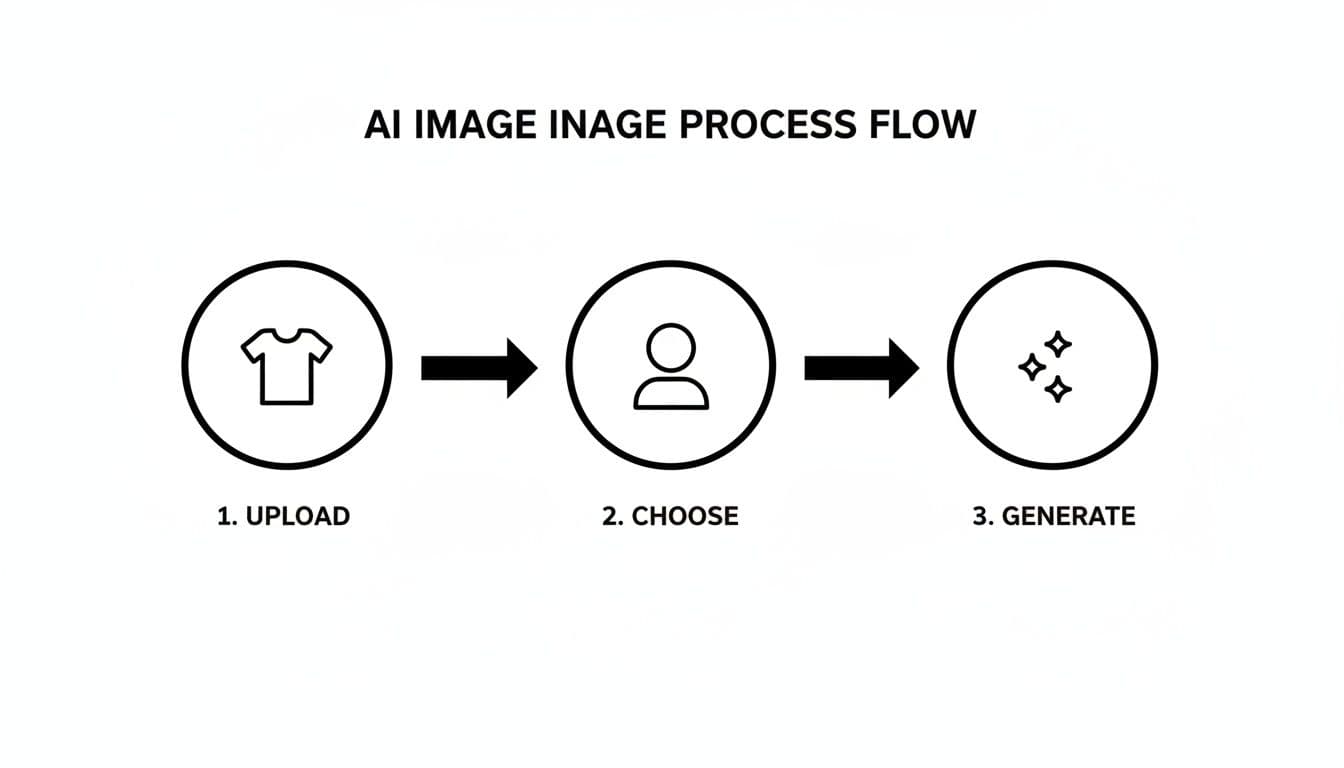
A three-step AI image generation process flow showing upload, choose model, and generate actions.
What used to be a multi-week, multi-person headache is now just a few clicks. It’s an insane amount of creative power put directly into your team’s hands.
Unlocking Creative Diversity and Inclusivity
Beyond pure speed, AI opens up a level of creative freedom and inclusivity that’s just not physically or financially possible the old way. Need to show your new dress on models representing five different ethnicities and body types? With AI, that’s not a logistical nightmare—it’s a few minutes of work.
This means you can:
- Truly Represent Your Audience: Generate visuals that actually look like your diverse customers, making your brand feel instantly more relatable and inclusive.
- Eliminate Geographic Barriers: Show your products on models that reflect local demographics in any market around the world, without flying a single person anywhere.
- Maintain Brand Consistency: Use the same virtual models across every single campaign to build a strong, recognizable brand identity that people remember.
This level of control ensures your brand’s visual story isn’t just beautiful, but also deeply connected to the people you’re trying to reach.
By removing the physical and financial barriers to diverse representation, AI empowers brands to create marketing that is not only more effective but also more ethical and inclusive by default.
It’s a powerful shift that builds stronger relationships, because shoppers finally see themselves reflected in your brand.
Boosting Conversions and Ad Performance
At the end of the day, every business decision has to answer to the P&L statement. The good news is, AI-generated imagery has a direct and measurable impact on the numbers that matter most, like conversion rates and ad engagement. We already know that high-quality, on-model photos are a huge factor in the decision to buy, with 76% of shoppers calling them the most helpful format out there.
When one luxury retailer put AI-powered on-model imagery to the test, they saw a staggering 157% increase in conversion rate and a 40% boost in shopper engagement. These aren't just small tweaks; these are massive lifts that directly drive more sales.
On top of that, AI makes hyper-efficient A/B testing a reality. Instead of commissioning two completely separate, expensive photoshoots to test different creative ideas, you can generate dozens of variations in minutes.
- Test different backgrounds to see what clicks with your audience.
- Compare various model poses to find out what drives the most engagement.
- Experiment with countless ad creatives for your social media campaigns at virtually no extra cost.
This ability to test and iterate at speed means you can optimize your marketing based on real data, not guesswork, making every dollar you spend on ads work harder. And the potential doesn’t stop with static pictures. Exploring tools that create an AI product video can bring a whole new layer of motion and energy to your product pages. The result is a more agile, data-driven marketing strategy that drives higher returns and builds a stronger connection with your customers.
Weaving AI Images Into Your E-Commerce Workflow
Switching to AI generated product images isn’t like flipping a switch. It's about building a smart, repeatable process that plugs directly into how you already work. To really nail it, you need a clear game plan—from prepping your source files and picking the right tools to keeping your brand’s visual identity consistent everywhere.
It all starts with your existing product photos. The quality of your AI-generated images is a direct reflection of the quality of your input. Think of it like a chef: the better the ingredients, the better the final dish. A crisp, well-lit, high-resolution photo of your garment is the single most important ingredient for creating images that look real.

A clean, modern home office workspace with an Apple iMac displaying various images on screen.
Preparing Your Product Photos for AI Success
Before you even log into an AI platform, a little prep work goes a long way. This first step is all about making sure the AI can clearly "see" your product's details, from the texture of the fabric to the tiny details in a pattern.
- Use High-Resolution Images: Always start with the largest, clearest photos you have. This gives the AI more data to work with, which means sharper, more detailed final images.
- Ensure Clean, Even Lighting: Ditch any photos with harsh shadows or bright hotspots that hide parts of the garment. Soft, diffused lighting is your best friend here.
- Isolate the Product: If you can, use photos of the garment on a simple, neutral background. This helps the AI focus only on the product without getting confused by distracting elements.
Spending a few extra minutes to get this right will save you a ton of headaches later and make a huge difference in how realistic your generated visuals look.
Choosing the Right AI Image Generation Platform
Not all AI tools are built the same, especially when it comes to the specific needs of fashion e-commerce. As you look at your options, think beyond just basic image generation and hunt for features that give you real control over your brand's look and feel.
The goal is to find a platform that feels more like a creative partner than a simple tool. For instance, the ability to create a consistent AI lookbook is absolutely essential for telling a cohesive story across an entire collection.
Here are the non-negotiable features to look for:
- Consistent Models: Can you use the same virtual model across dozens of product shots and campaigns? This is key for building a recognizable brand identity.
- Pose Control: Does the platform let you pick specific poses? This control is vital for showing off different angles of a garment and matching the imagery to your campaign's vibe.
- Background Customization: Look for tools that let you easily define or upload your own branded backgrounds. Every image should feel like it belongs to your brand, not a generic template.
Platforms like WearView were designed with these exact needs in mind, offering a suite of tools that deliver both creative freedom and brand consistency.
A Step-by-Step Integration Roadmap
Once you've got your prepped photos and have picked your platform, you can start weaving AI into your daily operations. You can break this down into a simple, repeatable cycle that connects content creation directly to your sales channels.
Generate Your Core Assets: Upload your prepared product photos and use the platform to generate a whole library of on-model images. Play around with different models, poses, and backgrounds to build a diverse set of visuals.
Organize and Tag Your Images: Don't just dump everything in one folder. Create a clear structure and tag your new images by product, collection, model, and how you plan to use them (e.g., "PDP," "social," "email").
Push to Your E-Commerce Platform: Load the new images directly into your product pages on Shopify, BigCommerce, or wherever you sell. Use A/B testing to see which images get the most clicks and drive the most sales.
Deploy Across Marketing Channels: Use your new AI-generated assets everywhere—from Instagram and TikTok to email newsletters and paid ads. This creates a unified brand experience that customers will remember.
The goal is to build a streamlined pipeline where creating new, on-brand visual content is no longer a major production but a simple, everyday task.
This workflow turns your content creation from a slow, painful process into a fast, iterative one. To really level up your operations, you can also explore a wider range of AI tools for ecommerce that can help with everything from copywriting to customer service. By taking a methodical approach, you can make sure every AI-generated image doesn't just look amazing—it actively works to grow your business.
Your AI Image Implementation Checklist
Getting started can feel like a big project, but breaking it down makes it manageable. This checklist walks you through the key phases of adopting AI-powered imagery, ensuring a smooth transition from your current workflow to a more efficient, creative one.
| Phase | Action Item | Key Consideration |
|---|---|---|
| 1. Preparation | Audit and select your best flat-lay product photos. | Focus on high-resolution images with clean, even lighting. The better the input, the better the output. |
| 2. Tool Selection | Research and choose an AI platform like WearView. | Prioritize features like consistent models, pose control, and custom backgrounds to maintain brand identity. |
| 3. Testing | Run a small batch of 5-10 products through the AI. | Does the output match your quality standards? Is the tool easy for your team to use? Work out any kinks now. |
| 4. Workflow Design | Define your new content creation process. | Who generates the images? Who approves them? How do they get from the AI tool to your Shopify store? |
| 5. Integration | Update a single product category with AI images. | Start small. This allows you to measure the impact on conversion rates and gather customer feedback safely. |
| 6. Scaling | Roll out AI imagery across all relevant products. | Create a schedule and systematically update your entire catalog, ensuring visual consistency across the site. |
| 7. Optimization | A/B test different models, poses, and backgrounds. | Continuously analyze performance data. Which visuals are driving the most sales? Double down on what works. |
By following these steps, you're not just adding a new tool; you're building a scalable system for visual content that can grow with your brand.
Common Mistakes and How to Avoid Them
Jumping into the world of AI generated product images gives you incredible creative freedom, but a few common missteps can wreck your results. Knowing what not to do is just as important as knowing how to use the tools. Steer clear of these pitfalls, and your final visuals will be consistently on-brand and effective.
The single biggest mistake? Starting with a bad source image. Think of the AI as a brilliant artist who needs a clear reference. If you hand it a blurry, poorly lit photo, it’s forced to guess—leading to distorted textures, weird colors, and a final image that just looks fake.
It’s the classic "garbage in, garbage out" problem. The AI needs clean data to produce clean output.
Ignoring Brand Consistency
Another huge pitfall is letting your visual identity fall apart. It’s easy to get excited and generate a ton of different images with random models, backgrounds, and moods. But without a clear set of brand guidelines, your product pages will quickly become a chaotic mess.
This visual noise confuses customers and kills your brand recognition. To keep things tight, you need to:
- Use Consistent Models: Pick a few virtual models that feel like your target audience and stick with them across your products. It creates a familiar face for your brand.
- Define Your Scenery: Lock in a set of approved backgrounds and lighting styles that match your brand’s vibe, whether that's clean and minimalist or bright and outdoorsy.
- Stick to a Pose Library: Build a go-to list of poses that show off your products well and fit your brand's personality.
These simple guardrails ensure every image feels like it belongs to your brand, building a professional and cohesive look.
Overlooking the Uncanny Valley
The "uncanny valley" is that creepy feeling you get when something looks almost human, but not quite right. Some AI tools can accidentally produce images that land right in this territory—a model’s expression might feel robotic, or their skin looks too perfect and airbrushed.
While a study found 71% of shoppers couldn't tell high-quality AI images from real photos, they lost trust fast when small details felt off. Little things like weird fabric textures, misplaced buttons, or unnatural wrinkles are dead giveaways.
Always review your images with a critical eye to sidestep this. Does the fabric hang right? Are the shadows believable? Using a platform like WearView, which is specifically trained on fashion and apparel data, dramatically lowers this risk by obsessing over photorealistic details from the start.
Neglecting Transparency with Customers
Finally, the most crucial mistake is a lack of honesty. The tech is impressive, but hiding the fact you’re using AI can seriously backfire if customers find out later. In fact, research shows that 59% of shoppers want brands to disclose when an image is AI-generated, seeing it as a sign of trustworthiness.
A simple, low-key label like "Virtual Model" or a quick note in the product description is all it takes. This small act of transparency builds trust and shows customers you're confident in your visuals. By being upfront, you turn a potential risk into a chance to strengthen your brand’s integrity.
As you start using AI-generated product images, you'll quickly run into two questions that go way beyond the tech itself. They hit on the core of your brand's trust and legality: Who actually owns these images? And how do we use this technology without being, well, sketchy?
Getting these answers right isn't just a box-ticking exercise. It's fundamental to protecting your business and building a brand your customers actually trust.
Getting the Green Light: Usage Rights and Ethical AI
Lock Down Your Commercial Usage Rights
First, the legal stuff. The single most important detail to confirm is commercial usage rights. When you create an image, you need ironclad certainty that you can use it everywhere—on your product pages, in your Meta ads, across social media, and in your email campaigns.
You can't afford to find out later that you owe royalties or are facing a legal claim. You need to know the images are yours, full stop.
Not all AI image platforms are the same, and their terms of service can be a minefield. A tool built for artists messing around on a Saturday has very different rules than one designed for a seven-figure e-commerce brand. Before you commit to any provider, you have to dig into their license and confirm it grants you full, unrestricted commercial use.
Look for crystal-clear language that says:
- You own the final images you generate.
- There are no surprise royalties or per-use fees down the line.
- You are free to use the assets across all marketing and sales channels, worldwide.
A reputable provider like WearView bakes this clarity right into their service. They make it simple: every image you generate is legally yours to use for commercial purposes. That's the kind of peace of mind you need.
Navigating the Ethics of AI Imagery
Beyond the legal paperwork, using AI responsibly means being thoughtful about ethics, especially around diversity and transparency. This tech gives you a powerful opportunity to build a more inclusive brand, but you have to handle it with care.
By removing the physical and financial barriers to diverse representation, AI empowers brands to create marketing that is not only more effective but also more ethical and inclusive by default.
This is your chance to move past the logistical headaches of traditional casting. You can actively use AI to feature a wide range of ethnicities, body types, and ages that genuinely reflect the people who buy your products. It’s an opportunity to create a visual identity that connects with a much broader audience.
Finally, you have to be straight with your customers. Don't hide the fact you're using AI. In fact, research shows a massive 59% of shoppers want brands to be upfront about using AI-generated visuals. They don't see it as a negative; they see it as a mark of honesty.
A simple, clear label like "Virtual Model" on your product pages is often all it takes. This small act of transparency tells your customers you respect them and are proud of the quality of your visuals. It turns a potential concern into a chance to build a stronger, more authentic relationship with your audience.
Here are the answers to the questions we hear most often as brands start exploring AI for their product visuals.
Can AI Really Get the Texture and Fit Right?
Absolutely. This is where modern AI shines. Today's platforms aren't just cutting and pasting your shirt onto a stock photo; they're trained on massive libraries of different fabrics and clothing styles.
This deep training helps the AI understand how a specific material—whether it's stiff denim or flowing silk—should actually drape, fold, and stretch on a person. The secret to getting a great result is starting with a clear, well-lit photo of your garment. That gives the AI all the data it needs to create a genuinely photorealistic virtual try-on.
How Do I Keep My AI Images On-Brand?
Maintaining your brand's unique look and feel is crucial, and the best AI platforms are built with this in mind. Consistency is key.
You can lock in your aesthetic by:
- Using the same set of virtual models across your entire catalog.
- Defining specific backgrounds that match your established style.
- Selecting poses and lighting presets that align with your brand’s personality.
Think of it like creating a brand style guide for your AI. By setting these clear parameters upfront, you ensure every image—whether on your site, social media, or in an ad—feels cohesive and reinforces your brand identity.
Is This a Good Fit for All My Fashion Products?
AI-generated imagery is incredibly versatile and works wonders for a huge range of products, from clothing and accessories to shoes and bags. It’s a total game-changer for creating the standard on-model studio shots you need for every product listing, and it does it at incredible scale.
What we're seeing now is a smart, hybrid approach. Brands use AI to quickly generate the bulk of their e-commerce visuals, which frees up their creative budget. Then, they reserve traditional photoshoots for the big, high-concept hero images needed for their flagship campaigns. It's the best of both worlds.
What About the Legal Rights to These Images?
This is a critical question, and one you should definitely be asking. Reputable, business-focused AI platforms like WearView are built to solve this problem. They provide clear licensing terms that grant you full commercial usage rights.
This means once you generate an image, it’s yours. You can use it on your website, in paid ads, and across all your marketing channels without ever worrying about royalties or surprise fees down the line.
Just make it a habit to always double-check a platform's terms of service. You want to be 100% sure you have the necessary legal permissions before you publish anything.
Ready to see how WearView can replace your expensive photoshoots with instant, studio-quality visuals? Start creating for free and transform your product photography today.
Tags:

WearView Team
WearView Content & Research Team
WearView Team is a group of fashion technology specialists focused on AI fashion models, virtual try-on, and AI product photography for e-commerce brands. We publish in-depth guides, case studies, and practical insights to help fashion businesses improve conversion rates and scale faster using AI.