
February 6, 2026•18 min read
AI Lookbook: The Workflow for Stunning Fashion Visuals
Learn how to craft an ai lookbook that converts: plan, generate, and distribute photoreal visuals with practical, proven steps.
Ai Lookbook: Discover the ai lookbook Workflow for Stunning Visuals
So, what exactly is an AI lookbook? Think of it as a complete collection of your brand's fashion visuals, all created with artificial intelligence. Instead of a physical photoshoot, your garments are digitally placed on incredibly realistic AI-generated models, set against any background you can imagine.
This approach gives brands a way to produce studio-quality marketing assets that are fast, remarkably cost-effective, and creatively limitless.
Why Your Brand Needs an AI Lookbook
A man reviews fashion images on a laptop and printed sheets, with a camera and 'SAVE on shoots' backdrop.
If you're in the fashion world, you know the drill. You're constantly under pressure to create fresh, eye-catching content, but you're also juggling tight budgets and even tighter deadlines. Traditional photoshoots, with all their moving parts—models, locations, photographers, stylists—can become a massive bottleneck.
AI lookbooks cut right through that complexity. The entire physical production process gets swapped for a streamlined digital workflow. This isn't just a minor tech upgrade; it’s a complete shift in how you create visual assets for your brand. Suddenly, you can generate an endless stream of on-brand imagery in minutes, not weeks, letting you launch campaigns and test new products at the speed of thought.
The Business Case for AI-Powered Visuals
Let's talk numbers. The switch to AI-generated fashion photography has a direct and measurable impact on your bottom line. Most brands making this move report an 80-90% reduction in their production costs. A standard photoshoot can easily run you anywhere from $2,000 to $10,000. In contrast, AI tools can pump out hundreds of unique images for a small monthly fee, a topic we dive into in our guide to the best AI tools for fashion brands. For lookbook-specific picks, our roundup of the best AI tools for fashion lookbooks compares the seven platforms most brands evaluate, with pricing tiers and a decision framework.
To put the efficiency gains in perspective, here's a side-by-side look at the old way versus the new way.
Traditional Photoshoot vs AI Lookbook Creation
| Factor | Traditional Photoshoot | AI Lookbook Generation |
|---|---|---|
| Timeline | 4-8 weeks (planning to final assets) | 1-2 days (asset prep to final images) |
| Cost | $2,000 - $10,000+ per shoot | $50 - $200 per month (subscription) |
| Personnel | Photographer, models, stylists, crew | 1 person (designer or marketer) |
| Logistics | Location scouting, equipment rental, travel | None (fully digital workflow) |
| Output Volume | 50-200 edited photos | Unlimited images |
| Flexibility | Limited to shoot day conditions | Infinite model, location, and style variations |
The table makes it clear: AI isn't just cheaper, it's exponentially faster and more flexible.
Beyond the cost savings, AI lookbooks unlock a level of creative freedom that was previously unimaginable. You’re no longer hemmed in by physical limitations. This newfound agility means you can:
- Get to Market Faster: Launch new collections online almost the moment they're ready, without waiting weeks to schedule a shoot and get photos back.
- Boost Creative Diversity: Experiment with models of every ethnicity and body type, or place your collection in a Parisian café one minute and a Tokyo street the next—all without booking a single flight.
- Scale Your Content Effortlessly: Create a massive volume of visuals tailored for every single channel, from your e-commerce product pages to endless variations for TikTok, Instagram, and email campaigns.
By dismantling the old barriers of cost and time, an AI lookbook levels the playing field, empowering brands of any size to compete with the kind of visually rich, dynamic marketing that actually moves the needle.
Ultimately, this lets you redirect your time and money toward what really matters: designing great products, building a strong marketing strategy, and connecting with your customers. It's a strategic pivot to a smarter, more agile way of creating content.
Building Your Creative Blueprint
Jumping straight into generating images without a plan is the fastest way to get a lookbook that feels random and off-brand. The real magic behind a cohesive AI collection happens before you touch a single prompt. This upfront work is your creative blueprint, the foundational plan that ensures every single visual hits your marketing goals.
So, what’s the first step? Figure out what this lookbook is for. Is it the grand reveal of your F/W collection, needing a moody, consistent theme? Or is it meant to fuel a six-week social media campaign, requiring a diverse stream of content? The answer shapes everything that follows, from the models you choose to the complexity of the scenes you build.
Defining Your Visual Identity
Once you know the why, it's time to build your mood board. But this isn't just about pinning a few nice photos. For AI, your mood board is a literal instruction manual. It’s the visual dictionary you'll use to teach the AI your brand’s unique aesthetic. The more dialed in it is, the better your results will be.
Here's what a killer mood board needs:
- Color Palette: Don't just say "pastels." Grab the exact hex codes and show how your primary and secondary colors should play together in a scene.
- Lighting Style: Are you after that soft, hazy morning light or something more dramatic and high-contrast, like a studio shoot? Find reference images that nail that specific feeling.
- Environments and Props: Be specific. Instead of "city," think "a sun-drenched Italian side street" or "a minimalist concrete loft." Collect images of the exact props and backdrops that fit your world.
- Model Poses and Expressions: Curate a library of poses that actually show off your clothes well. Add expressions that match your brand’s vibe—is it joyful, serene, or a little bit edgy?
A well-defined mood board is your primary communication tool for the AI. The more specific your visual references are, the more consistently the AI can replicate your aesthetic across hundreds of images.
Preparing Your Product Assets
Finally, let's talk about prepping your actual product images. This is a classic "garbage in, garbage out" situation. The quality of your input photos directly impacts the realism and accuracy of your final AI-generated shots.
To give the AI the best possible chance to work its magic, you'll want high-resolution, evenly lit photos of your garments. A powerful AI prompt generator can also be a massive help here, guiding you on how to describe your assets for the best results.
The gold standard? Flat lays shot on a clean, neutral background or simple photos on a mannequin. Make sure the entire garment is visible, everything is in sharp focus, and there are no harsh shadows or distracting wrinkles. This clean slate gives the AI all the visual data it needs to understand the product’s shape, texture, and how it should drape on your AI models. With this blueprint locked in, you're ready to start bringing your vision to life.
Alright, you’ve got your creative blueprint nailed down. Now for the fun part: bringing that vision to life. This is where we move from mood boards and planning into actually producing the photorealistic images that will define your AI lookbook. It's all about guiding the AI to create a visual story that feels completely aligned with your brand's soul.
This is where you'll really see the magic happen. The market for AI-generated fashion photography isn't just growing; it's exploding. It hit $1.51 billion, then jumped to $2.01 billion in a single year—that's a staggering 32.5% growth rate. Experts are predicting it will swell to $6.12 billion within five years, which tells you everything you need to know about where the industry is heading.
This entire creative process, from defining your goals to prepping your assets, is what sets you up for a smooth, successful generation phase.
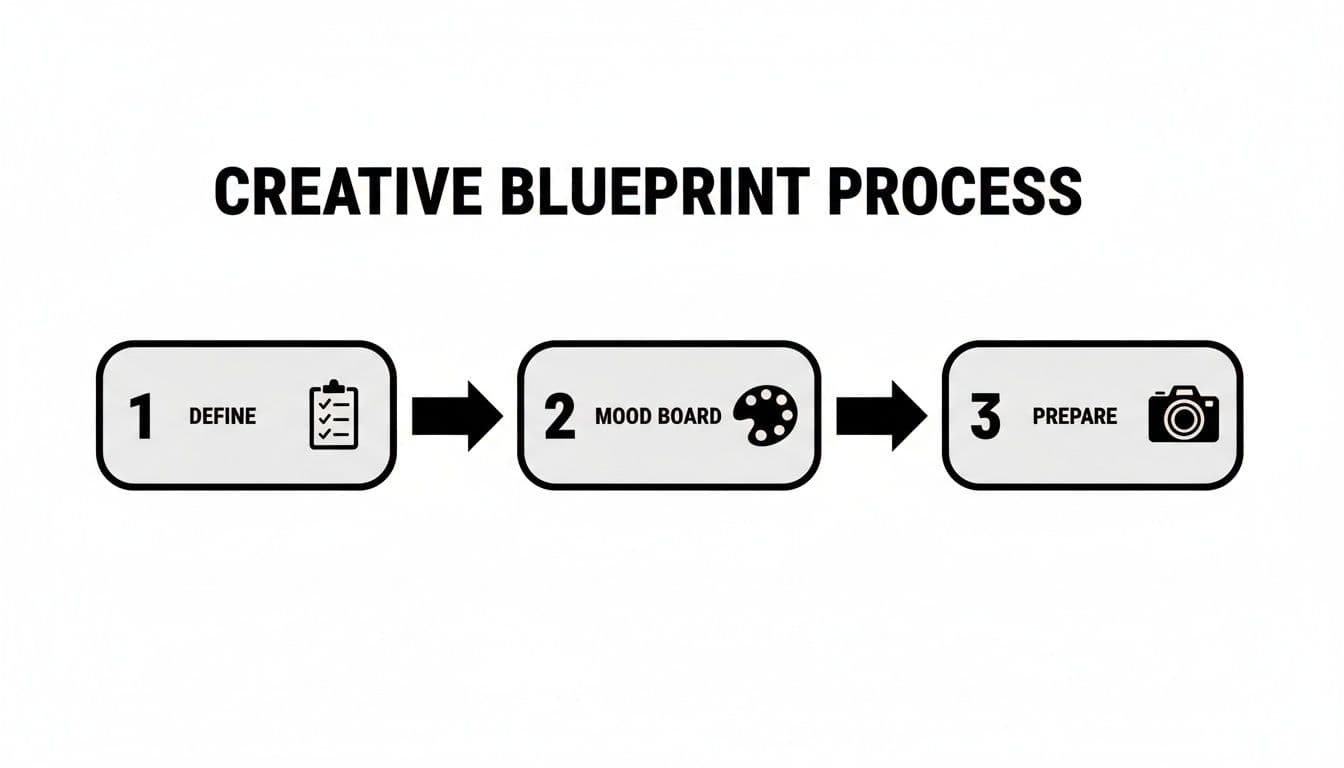
A creative blueprint process flowchart showing three steps: define, mood board, and prepare with icons.
Think of that roadmap as your foundation. Solid planning is the only way to get consistent, high-quality results from any AI tool.
Choosing Your Models and Nailing the Prompts
Your first big move is deciding who will wear your collection. You can pull from a huge library of existing AI models or, for total control, create your own custom ai generated models from scratch using simple text prompts. This gives you the power to find or build a face that truly speaks to your target customer.
With your model sorted, the text prompt becomes your director's megaphone. Writing a great prompt is more art than science, and specificity is your best friend. Vague requests get vague results. So, instead of asking for something like "model in a city," you need to get granular:
"Photorealistic image of a woman with long brown hair, standing on a cobblestone street in Paris, soft morning light, wearing a beige trench coat, looking confidently at the camera, shallow depth of field."
See the difference? That level of detail gives the AI clear instructions on everything: the model's look, the exact location, the lighting, the garment, the pose, and even the camera settings. It’s this kind of precision that allows brands to do incredible things at scale, like in the case study about optimizing 20,000 products with AI for a massive e-commerce player.
Setting the Scene and Directing the Pose
The environment is just as critical as the model wearing the clothes. Are you going for a clean, minimalist studio vibe where the garment is the undisputed hero? Or does your collection's story demand a more atmospheric backdrop, like a sun-drenched beach or a moody, fog-filled forest? Your prompt can define every single element of the scene.
Finally, you need to think about the pose. This is the last piece of the puzzle, and it’s a big one. The way a model stands, moves, or sits can completely change how a garment is perceived. A strong, angular pose might accentuate the sharp tailoring of a blazer, while a soft, fluid stance could highlight the beautiful drape of a silk dress. The best AI tools give you incredible control here, letting you generate shots that put the spotlight on the unique fit, texture, and details of every single piece.
Elevating Your Lookbook with AI Video
While photorealistic stills are the foundation of any great AI lookbook, motion is the next frontier. Static images get the job done, but video is where your garments truly come alive. It's how you showcase the subtle drape of a fabric or the flow of a silhouette in a way a single frame just can't capture.
More importantly, it’s how you stop the scroll on platforms like TikTok and Instagram Reels.
Turning your generated stills into short, dynamic clips adds an entirely new dimension to the shopping experience. You're not just showing a product anymore; you're demonstrating a feeling and a lifestyle. This used to mean a massive production hurdle, but now you can get that movement without the cost and complexity of a traditional video shoot.
From Still Image to Moving Garment
The process is simpler than you think. It all starts with the high-quality still images you’ve already created. Using AI video tools, you can animate these static shots to create subtle movements that mimic a live-action recording.
Think about your model turning slightly to show off the back of a dress, or the fabric of a coat gently rippling as if caught in a breeze. These aren't meant to be full-blown cinematic productions. They are short, captivating clips designed to grab and hold attention online. The goal is to add just enough motion to make the garment feel real and tangible.
This technique works wonders for website banners, product pages, and social media ads, where even a few seconds of movement can dramatically boost engagement. Some platforms even offer specialized tools to create compelling ai fashion videos directly from your existing lookbook assets.
Structuring Your Video for Maximum Impact
An effective AI lookbook video is short, focused, and visually punchy. From what we've seen, the sweet spot is between 5 and 15 seconds—perfect for the fast-paced world of social media.
Here’s a simple structure that consistently performs well:
- The Hook (0-2 seconds): Kick things off with an eye-catching wide shot of the full outfit in its environment.
- The Detail (3-6 seconds): Use a subtle zoom or pan to highlight a key feature—the texture of the fabric, a unique button, or some intricate embroidery.
- The Movement (7-10 seconds): Now, show the garment in gentle motion to emphasize its fit and flow.
- The Call to Action (11-15 seconds): End on a strong, static shot of the product, often paired with a text overlay or your branding.
By animating your stills, you’re creating a richer, more interactive lookbook. This simple step bridges the gap between seeing a product and truly imagining what it would be like to wear it, making the path from inspiration to purchase feel much more natural.
This strategy ensures your videos don't just look good; they serve a clear marketing purpose by guiding the viewer’s eye and highlighting what makes each piece special.
Polishing and Preparing Your Visual Assets
A modern workspace featuring an Apple iMac and iPad used for photo editing on a wooden desk.
The AI gets you 90% of the way there, generating some incredible shots that really nail your brand's vision. But that last 10%—the final polish in post-production—is what turns a good ai lookbook into a truly exceptional one. This is where you add the professional touch that gets your assets ready to convert, no matter where they show up.
Even the best AI generations can use a little love. A quick run through your favorite editing software to tweak brightness, contrast, or saturation makes a world of difference. It's how you guarantee perfect color consistency between the screen and the real-world garment, which is absolutely vital for maintaining brand trust.
Optimizing Images for Every Platform
Your finished images have to do two things perfectly: look amazing and load fast. That holds true whether they’re on a product detail page, an Instagram story, or a paid ad. Each platform has its own quirks and requirements, and optimizing for them is non-negotiable for a good customer experience. Nothing kills a sale faster than a slow-loading image.
Here are the specs I always stick to:
- E-commerce Product Pages: Go big. At least 2048 x 2048 pixels is the standard now, giving customers that high-quality zoom they expect. Keep the file size under 500 KB using a modern format like WebP to keep things snappy.
- Social Media Feeds (Instagram, Facebook): For the main grid, a 1080 x 1080 pixel square is classic, but a 1080 x 1350 pixel vertical format will grab more screen real estate and attention.
- Digital Ads (Display & Social): This is all about following the rules. Every ad network has specific dimensions you need to hit. Always compress these images as much as you can without losing visual quality—load speed is everything here.
Getting these technical details right is what elevates your project from a simple folder of cool images into a hard-working marketing asset.
Securing Your Commercial Usage Rights
Beyond the pixels and edits, there’s a crucial legal box you have to check: commercial usage rights. This is a big deal, and not all AI image platforms handle it the same way. The last thing you want is a legal headache down the road because you used an image without the proper license.
This is the one area you can't afford to get wrong. Before you pay for any AI service, dig into their terms and confirm that your plan gives you full, unrestricted commercial rights to everything you create. You need the freedom to use these assets in ads, on your website, and in any marketing material without ever thinking about royalties or hidden fees.
Choosing a service that bakes these rights into your subscription is a huge win. It means every visual you create, from simple product to model shots to complex scenes, is truly yours to own and use however you see fit. This final check is what makes your professional, perfectly optimized AI lookbook ready for launch.
Getting Your AI Lookbook in Front of Customers
You’ve done the hard work and created a stunning AI lookbook. That’s a huge win, but don't pop the champagne just yet. A folder full of brilliant images doesn't sell clothes. A smart distribution plan does. This is where your powerful new assets become a sales engine.
First things first, get those visuals onto your own turf: your e-commerce site. Weave them into your product detail pages, collection galleries, and homepage banners. This immediately elevates the shopping experience beyond boring, flat product shots on a white background. It helps customers see the whole picture—how a single piece fits into a larger story and a real-life context.
Taking the Campaign to Social Media
With your website looking sharp, it’s time to hit social media. The goal here isn't to just dump the entire lookbook in one go. Treat it like a proper campaign launch, building a narrative and rolling it out strategically to build excitement.
- Instagram: Go all-in on mixed media. Drop your most powerful stills into the feed, cut your AI-generated videos into compelling Reels, and leverage Stories for behind-the-scenes vibes, polls, and direct "shop the look" links.
- Pinterest: This is where visual discovery happens. Create dedicated boards for the new collection, pinning each look individually. Critically, make sure every pin links directly back to the product page to capture that high-intent traffic.
- Facebook: Carousel ads are your best friend here. They're perfect for showcasing multiple outfits from the lookbook, telling a cohesive story about the collection, and driving those all-important click-throughs.
This kind of multi-channel push is exactly why AI is making such waves in fashion. The global AI in fashion market, currently valued at a cool $1.81 billion, is on track to explode to $40.81 billion within the next ten years.
That’s a staggering 41.39% CAGR, driven by AI's power to create the kind of personalized, engaging experiences that turn browsers into buyers. If you want to go deeper on the numbers, you can check out the full market analysis on Fortune Business Insights.
Finally, and this is non-negotiable, you have to measure everything. Track engagement rates on your social posts, click-through rates from your email blasts, and—most importantly—the conversion rates on your product pages.
This data is pure gold. It tells you exactly which models, looks, and scenes are connecting with your audience. Use these insights to guide your next campaign, ensuring every AI lookbook you create is smarter and more effective than the last.
Common Questions, Answered
Jumping into AI-powered content can bring up a few questions. Let's tackle some of the most common ones we hear from brands building their first AI lookbook.
What Kind of Product Photos Do I Need?
For the best, most realistic results, you need clean, well-lit photos of your garments. Think flat lays on a simple, neutral background. Simple hanger shots or photos on a mannequin also work incredibly well.
The main goal is to give the AI a completely unobstructed view of the garment. You want to avoid harsh shadows, excessive wrinkling, or anything else that might distract it. Clean input is the secret to getting the AI to accurately see your product's shape, texture, and how it's supposed to drape.
Can I Keep My Brand's Model Consistent?
Absolutely. This is a huge advantage of using a dedicated platform. You can pick one AI-generated model and use her across your entire lookbook, seasonal campaigns, and social media, effectively creating a recognizable face for your brand.
If you want even more control, you can create a completely custom model from scratch just by describing her. This feature is a game-changer for brands with a very specific aesthetic, letting you dial in every detail to ensure your visuals are always perfectly on-brand.
What's the Deal with Commercial Rights for AI Images?
This is a big one, and the answer is simple: it completely depends on the platform you use. It is absolutely critical that you choose a service that gives you full commercial usage rights from the get-go, with no hidden fees or royalties.
A good subscription should wrap these rights into your plan. That gives you the freedom to use your images and videos everywhere—your website, social media, paid ads—without worrying about legal headaches popping up later.
Ready to create stunning, on-brand visuals in minutes? With WearView, you can generate an entire AI lookbook, from photorealistic model shots to dynamic video clips, all while cutting production costs by up to 90%. Start creating with WearView today.

WearView Team
WearView Content & Research Team
WearView Team is a group of fashion technology specialists focused on AI fashion models, virtual try-on, and AI product photography for e-commerce brands. We publish in-depth guides, case studies, and practical insights to help fashion businesses improve conversion rates and scale faster using AI.


